Windowed Fullscreen
Full-window YouTube that doesn't hide your taskbar
- 6controls beside YouTube's fullscreen button
- 3columns that dock beside the video (the transcript with Pro)
- 2permissions requested, nothing more
- $10once for lifetime Pro
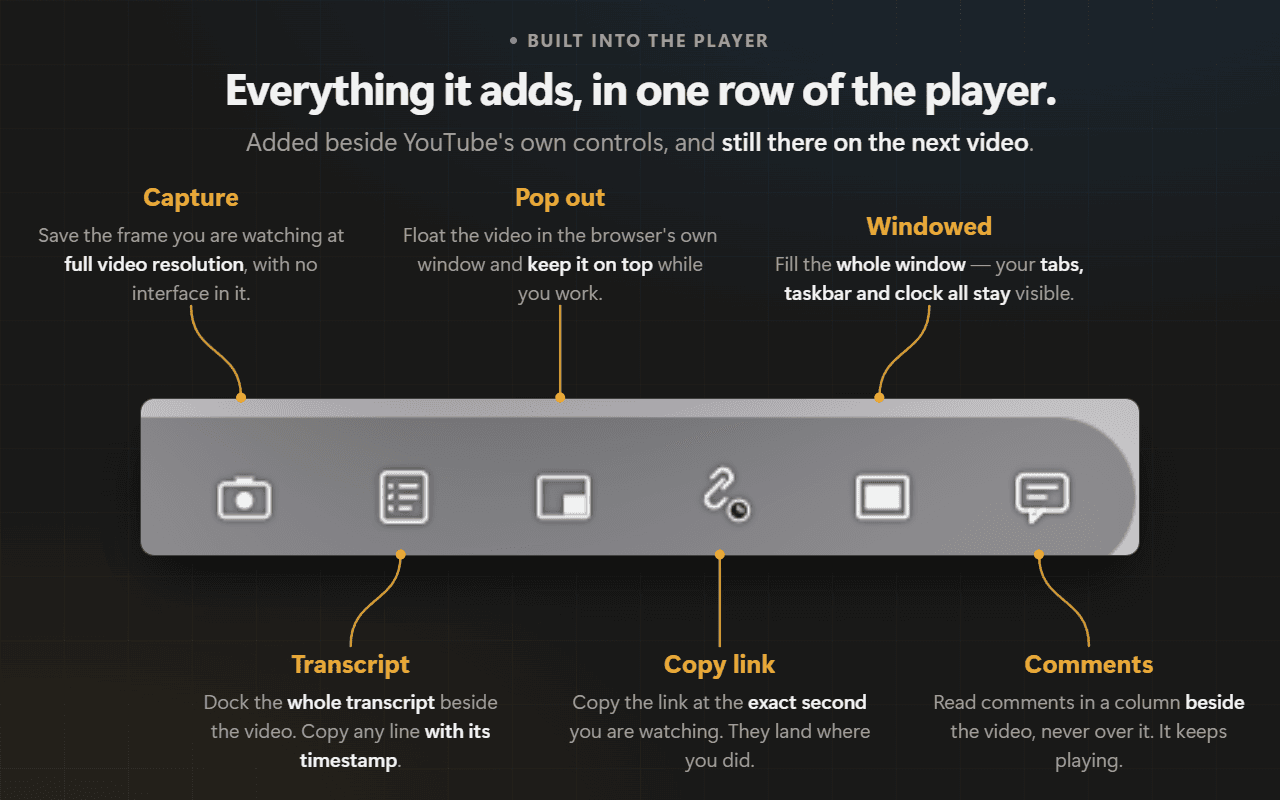
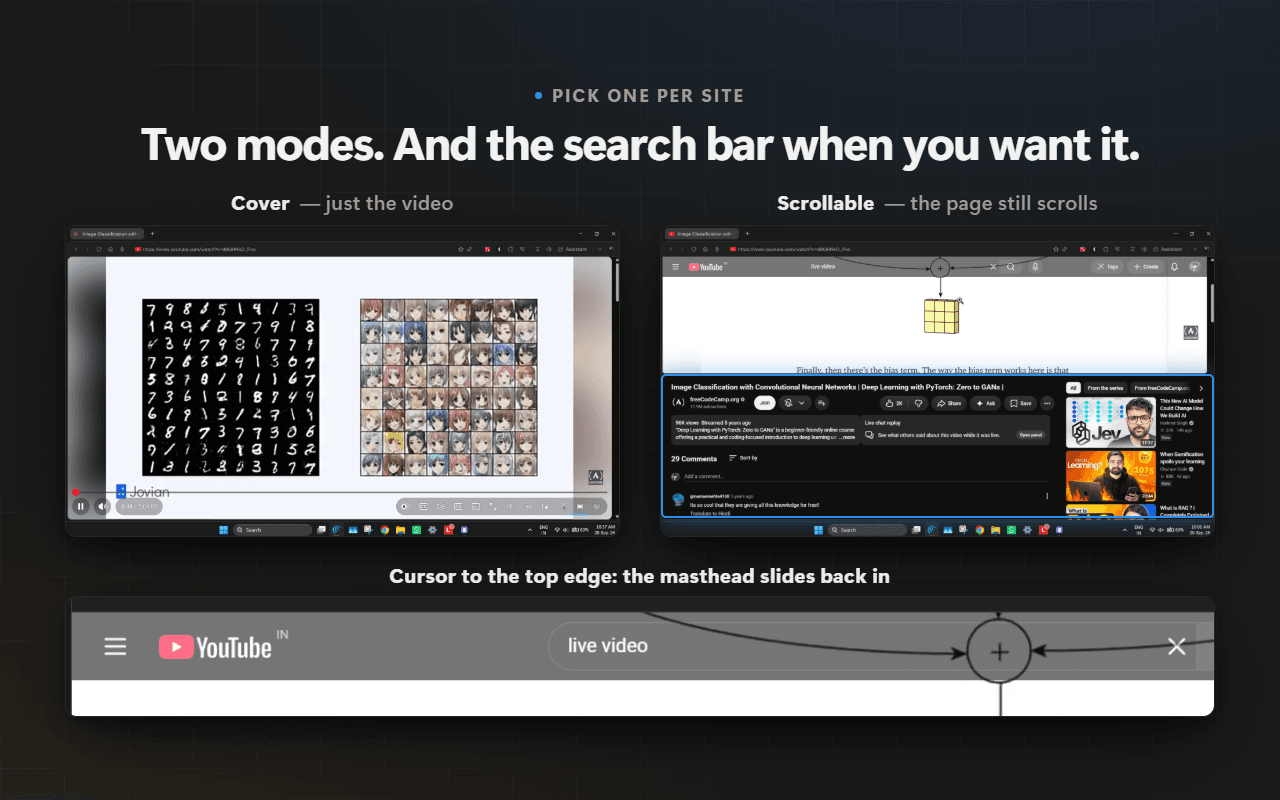
Native fullscreen takes over your whole display, so the moment you need a tab, a message, or the clock, you have to drop out of it. Windowed Fullscreen adds a second viewing mode right next to YouTube's own fullscreen button: the player fills your entire browser window, but the browser Fullscreen API is never called. Your tab strip, taskbar, clock, and notifications all stay exactly where they are. Six controls sit beside YouTube's fullscreen button, and the comments and live chat dock beside the video rather than covering it, each taking width from the player instead of sitting on top of it. The masthead slides back in whenever you move the cursor to the top edge. Pro adds the transcript as a third column, resizable docks, frame capture at the video's own resolution, ambient glow, and custom letterbox colours.
Live demo
Try Windowed Fullscreen right here
A working, in-memory simulator — try the features in real time, right in your browser.
Screenshots
See it in use.
What it does
Everything Windowed Fullscreen does.
One job, done properly. Here is each part of it.
Fills the window, not the display
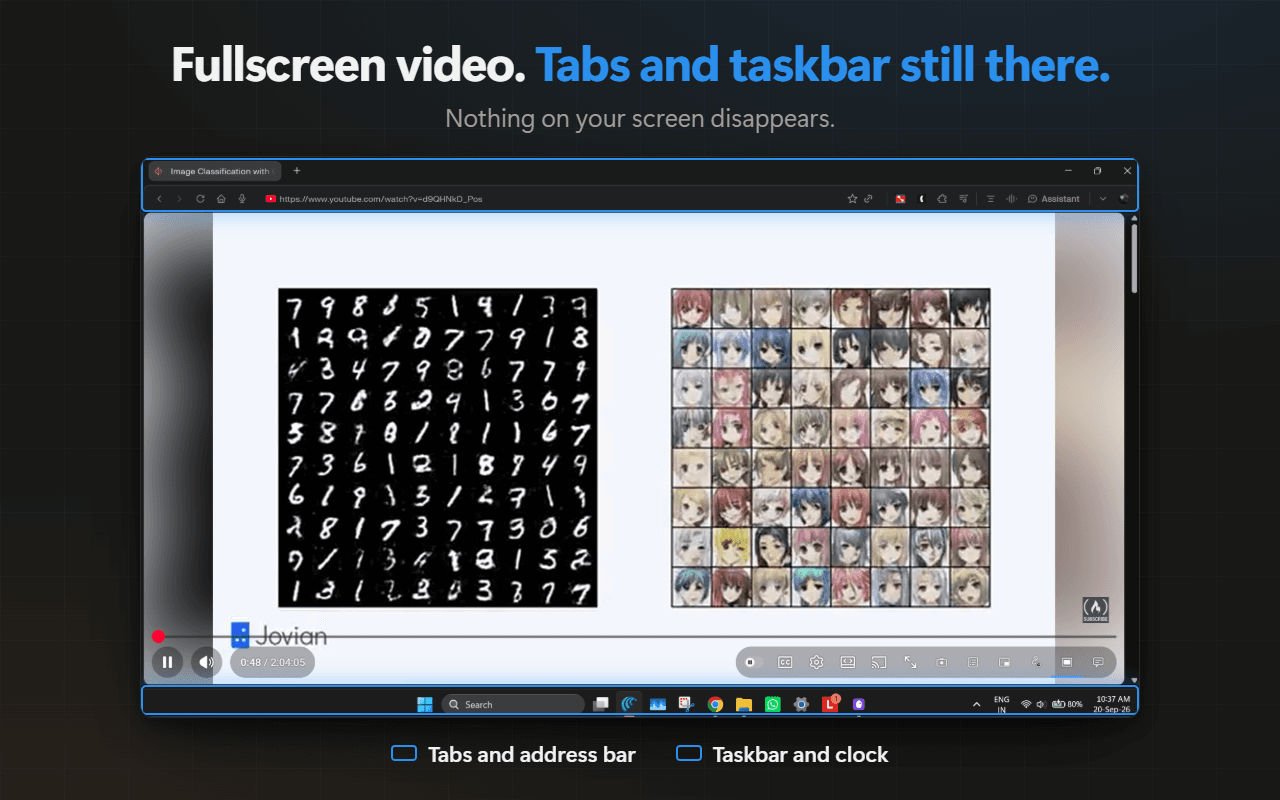
The player expands to every edge of your browser window using CSS, never the browser's Fullscreen API.
Your taskbar stays put
Tab strip, address bar, clock, and notifications remain visible, so nothing interrupts you to get to them.
Three columns beside the video
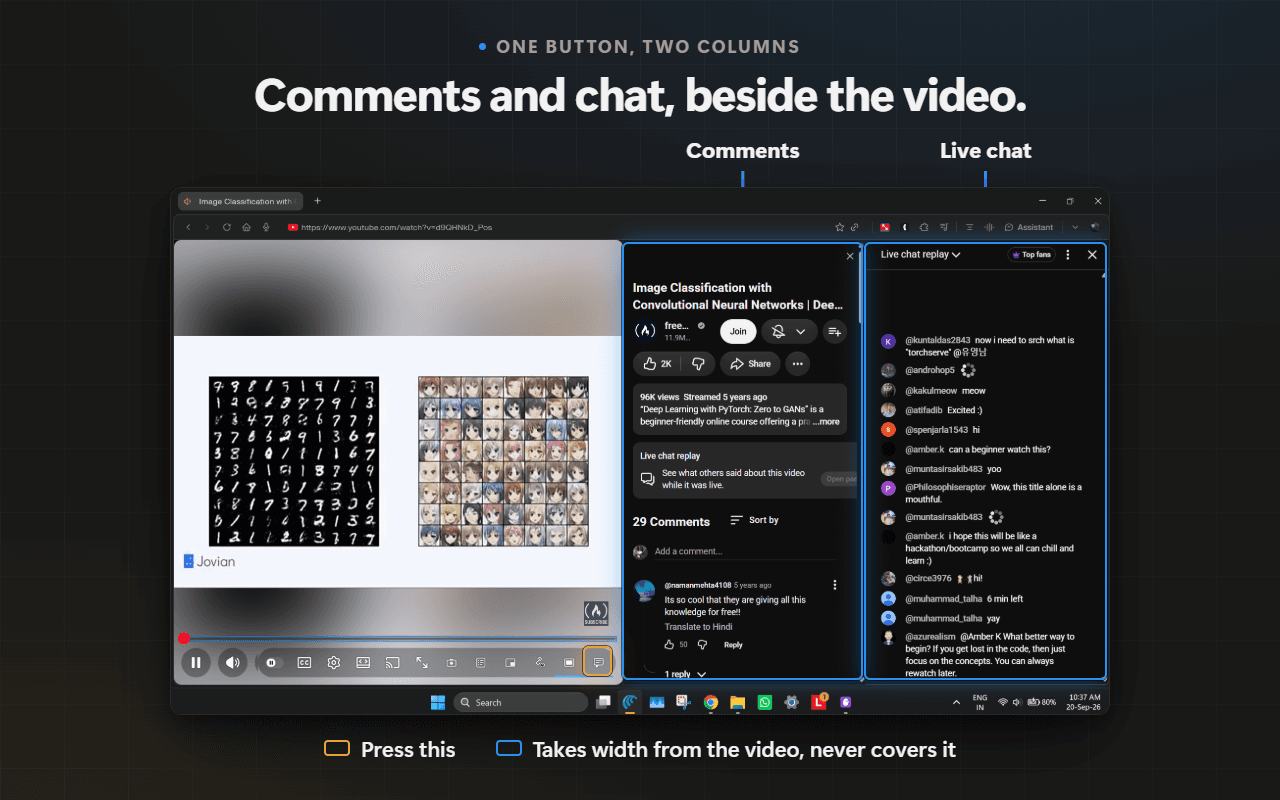
Comments and live chat dock beside the player, plus the transcript with Pro — each taking width from the video, never covering it.
Pop the video out, and back
One press floats the video above every window, and a second brings it back — into windowed mode, with the comments still docked, if that is where you started.
Capture the frame you are watching (Pro)
Save the current frame at the video's own resolution, with no interface in the picture, to your downloads or clipboard.
Resize the docks, light the bars (Pro)
Drag any docked column to the width you want, and let the letterbox bars glow with the video's own colours.
Pricing & licensing
Simple, fair pricing.
One-time purchase · No recurring subscriptions · Checkout handled by Dodo Payments.
Free
- Windowed fullscreen on YouTube — cover or scrollable, per site
- Comments and description docked beside the video
- Live chat docks beside the player on livestreams
- Picture-in-picture, in one click
- Copy the video link at the current timestamp
- Idle cursor auto-hide, and masthead reveal on hover
- Button, popup, Alt+Shift+F and Alt+Shift+D
- No account, no tracking, no ads
Pro
- Everything in Free — and everything free stays free
- Drag the comment, live chat, and transcript columns to any width
- Dock the interactive transcript in a column of its own
- Save the current frame at the video's own resolution
- Custom filename templates: {title}, {channel}, {date}, {time}
- Burn the playback time onto a saved frame
- Ambient glow: letterbox bars lit from the video's own colours
- Custom letterbox colours: 5 swatches, 6 gradient themes, or your own hex colour or CSS gradient
- One payment, lifetime licence — no renewal, no account
Transparency
Permissions & data practices
Every permission requested by Windowed Fullscreen is documented here with its exact technical reason.
- Data collected: None for free use. If you buy Pro, the licence key you enter is stored on your device and sent to Dodo Payments — the payment provider that issued it — to confirm the purchase: once when you enter it, roughly once a fortnight after that, and once more if you remove it. That request carries the key and an id for this device's activation, which Dodo issues when you first enter the key so that one purchase can cover a limited number of devices. The activation id is not a fingerprint: it carries nothing about your machine, and the name this install registers under is a fixed string, identical on every install. Nothing else is ever sent: no account, no email, no page you were on, no video, no browsing history, and no settings. There is no server on our side, so there is nowhere for anything to be kept. Saving a frame is entirely local.
- Data sent off device: Yes
- Data shared with third parties: Yes
Questions
Frequently asked questions
Release history
What's changed
- Windowed mode no longer makes YouTube lag: style recalculation is back to about what YouTube costs with no extension
- A shorter in-page Pro prompt and a more compact upgrade screen in the popup
- The Feedback and suggestion links open the contact page
- No change to what is free or paid, the price, or permissions
- Pro, $10 once: resizable docks, the transcript dock, frame capture, custom filename templates, burned timestamp, ambient glow, and custom letterbox palettes
- Live chat docks beside the player on a livestream, following YouTube's own chat toggle
- A picture-in-picture button — free, and an alternative to windowed mode rather than a layer on top of it
- Copy the video link at the current timestamp, from the player bar
- The suggestions rail is back in scrollable mode, beside the comments
- Idle cursor auto-hide, on by default and switchable per site
- Six controls in the player bar, up from two
- The settings moved into the toolbar popup; the separate options page is gone
- A close button on the docked comment panel, and Alt+Shift+D to toggle it
- The revealed masthead now ends where a dock begins, so it no longer covers a docked panel's own controls
- A refused license key now says which kind of refusal it was, so a key at its device limit no longer reads as a typo
- Performance: six causes of lag on every watch page fixed, and the injected script is 39% smaller
- Fixed: a protected video reports a blank frame instead of saving black; the transcript docks the moment you press it; saved frames always land on Windows
- One network request, and only with a license key: the key is verified with Dodo Payments. Without a key there are still none
- Removed: the separate options page — the toolbar popup is now the only settings surface
- Rebuilt settings, popup, and options UI
- A welcome page on install: thanks, one pin instruction, and four usage hints
- A rating row in the settings footer, and a prompt asked once in the extension's whole life
- A permanent feedback link, rather than one gated behind a low score
- A collapsed Tips section showing the keyboard combination the browser actually has registered
- Fixed the chapter title in the player bar doing nothing in windowed mode — it now hands the page back and opens YouTube's Chapters panel
- Fixed the rating prompt destroying itself on sight, and its controls overlapping in the popup
- Fixed synthetic resize events firing at a page the extension no longer owned after an in-app navigation
- Fixed restoring the player's inline layout undoing half of itself
- First published release: a windowed-fullscreen button beside YouTube's own fullscreen control, the toolbar popup, Alt+Shift+F, Escape to exit, cover and scrollable modes, the masthead reveal, and optional per-site auto-apply
- Comments button: docks the channel, subscribe, likes, description, and comments into a column beside the player
- Escape now backs out one layer at a time — side panel first, then the mode
- Fixed the side panel rendering as a solid black column on YouTube's light theme
- Fixed the revealed masthead painting behind the player, which made it impossible to click
- Smoother masthead reveal: quicker in than out, so drifting past the top edge no longer snaps it away
- Stopped YouTube's own top-right overlay from swallowing the hover at the top edge
- Fixed the chapter row wrapping its last segment onto a second line, which painted a stray red line under the scrubber
The official home of Windowed Fullscreen
Windowed Fullscreen is built and supported by Rohit Tiger, a one-founder software business. Pricing, documentation and support live here; licence keys are issued by Dodo Payments at checkout.